
Delta Executor v2.715
• Download #1 iOS Roblox Exploit •
Official Delta X 10.80 ipa File
Fast, undetectable, and 100% free Roblox script executor for iOS. Delta Executor Download Works with the latest Roblox updates. [OFFICIAL] » #1 Roblox Exploit for iphone.
Join Discord • How to Install Using ESign • How to Install with Sideloadly • Key Guide
What is Delta Executor iOS?
Delta Executor iOS is a lightweight and powerful Roblox script executor made for iPhone and iPad. Unlike most executors that are only available on Windows or Android, Delta Executor for iOS gives Apple users the same script execution power directly on their iOS devices.
With Delta iOS, you can inject custom scripts into Roblox games and unlock exciting features like:
- Auto farm
- Infinite coins & gems
- Speed hacks
- ESP & Aimbot
- Game-specific cheats (Blox Fruits, Pet Simulator X, and more)

Delta Executor iOS is special because it’s made just for iPhones and iPads. Many executors only work on Android, but Delta Executor works on all platforms i.e. Android, Windows, and iOS with features like lighter, faster, and doesn’t crash much, even when running big scripts. It works smoothly with both simple and advanced scripts, giving players a better experience than most Android executors.
Another big plus is updates. Roblox changes often break other executors, and users have to wait a long time for fixes. But with Delta iOS, the team updates it quickly after Roblox patches. This means you can keep playing without long breaks, making it more reliable than many other executors.
Delta Executor iOS Features
Delta Executor for iOS brings a powerful and seamless Roblox exploiting experience right to your iPhone or iPad. With its lightweight design, fast execution speed, and wide script compatibility, it allows mobile users to enjoy the same premium features that PC players get. Whether you’re running Blox Fruits, Pet Simulator X, or any other Roblox game, Delta Executor iOS ensures smooth script injection, stability, and a user-friendly interface designed for Apple devices.
No Jailbreak Required
Works on iPhone & iPad without modifying your device.
Supports Latest Roblox iOS Update
Always updated for new Roblox patches.
Script Hub Included
Access preloaded Roblox scripts.
Delta Executor Key System (Appleware Key)
Secure key system for safe script execution.
iPhone & iPad Support
Works on iOS 14, iOS 15, iOS 16, iOS 17, and beyond.
Lightweight & Fast
Runs smoothly without lag.
How to Download Delta Executor IPA on iPhone (Step-by-Step Guide)
If you want to unlock the full potential of Roblox on iOS, installing Delta Executor IPA on your iPhone is the best option. Delta Executor is one of the most powerful and updated Roblox executors for iOS, allowing you to run advanced scripts, cheats, and custom features without needing jailbreak. Below is a step-by-step guide to help you download and install the latest Delta Executor iOS & IPA file safely.
Andriod System Requirements
- Operating System: Android 6.0 or higher
- Processor: Octa-Core, 1.6 GHz or above
- RAM: 4 GB or more
- Storage: At least 200 MB of available space
- Internet Connection: Minimum 4G
- Permissions Required:
- Camera
- Gallery
- Install from Unknown Sources
iOS System Requirements
- Operating System: iOS 12.2 or later
- Processor: A11 Bionic chip or newer
- RAM: 3 GB or more
- Storage: At least 180 MB for the app, plus additional space for Roblox game data
- Internet Connection: Minimum 4G
- Permissions Required:
- Camera
- Gallery
- Install from Unknown Sources
Requirements Before You Start
Before downloading Delta Executor iOS, make sure you have:
- An iPhone or iPad running iOS 14 or above
- A PC if using Sideloadly IPA
- OR just your iPhone if using Esign IPA installer
- The latest Delta Executor IPA file (official version)
- A stable internet connection
Method 1: Install Delta Executor IPA using Esign
Esign is a no-PC method to install the Delta Executor iOS IPA directly on your iPhone or iPad.
Steps:
- Download and install Esign App on your iPhone.
- Get the official Delta Executor IPA file.
- Open Esign and tap Import to upload the IPA file.
- Tap on the Delta Executor IPA and select Install.
- Wait for the installation process to finish.
- Go to Settings > General > VPN & Device Management and trust the developer profile.
- Now open Delta Executor iOS from your home screen and start running Roblox scripts.
Still confuse? See our step-by-step guide by pressing the button bellow.
Method 2: Install Delta Executor IPA using Sideloadly
Sideloadly is a PC method to sideload the Delta Executor IPA file onto your iPhone.
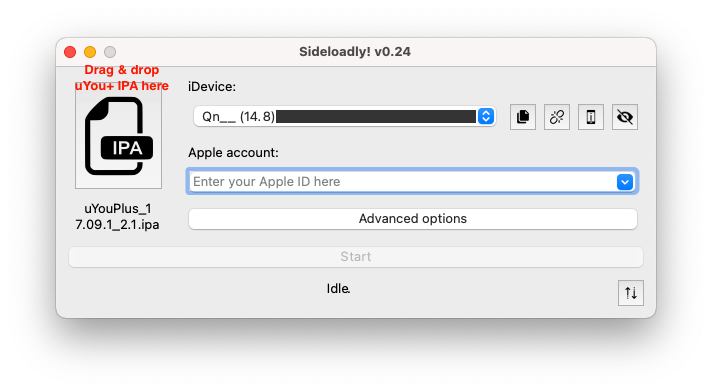
Steps:
- Download and install Sideloadly on your PC.
- Connect your iPhone or iPad via USB cable.
- Get the latest Delta Executor IPA file.
- Open Sideloadly and drag the IPA file into the app.
- Enter your Apple ID when prompted.
- Wait for the installation to complete.
- On your iPhone, go to Settings > General > VPN & Device Management and trust the Delta Executor profile.
- Launch Delta Executor iOS and enjoy Roblox exploiting.
Still confuse? See our step-by-step guide by pressing the button bellow.
Download Delta Executor Latest Version
v2.705 for iOS
Roblox Executor Alternatives for iOS
While Delta Executor iOS is one of the most powerful and stable Roblox script executors for iPhone and iPad, some users may want to try other options. Below are the most popular Roblox executor alternatives for iOS that you can explore:
1. Arceus X iOS
Arceus X is one of the most well-known Roblox executors for both Android and iOS. The iOS version allows players to inject scripts, run custom mods, and use a script hub for popular Roblox games like Blox Fruits and Pet Simulator X. However, updates are not always as frequent as Delta Executor’s, and the stability can vary.
2. Appleware Executor
Appleware is a newer iOS Roblox exploit that has gained attention for being lightweight and simple to use. It supports no-key execution, making it a hassle-free option for players who want to bypass complicated key systems. Many users download it as a backup executor alongside Delta Executor.
3. Fluxus iOS
Fluxus is another well-known Roblox script executor iOS with strong community support. It provides a clean user interface, script hub, and regular updates. It is often compared to Delta Executor in terms of performance, though some players report more crashes depending on their iOS version.
4. Codex Executor iOS
Codex is a newer competitor in the Roblox iOS exploit market. It offers high script compatibility and works on both iPhone and iPad. The app can be sideloaded using tools like Sideloadly or Esign IPA installer. Codex is becoming popular among users looking for a free, reliable, and easy-to-use executor.
Which iOS Roblox Executor is Best?
Among all available options, Delta Executor iOS still stands out as the #1 Roblox executor for iPhone and iPad due to its stability, fast updates, wide script support, and user-friendly design. However, having alternatives like Arceus X iOS or Fluxus iOS ensures that you always have a backup if one executor faces downtime.
Delta Executor iOS FAQs
What is Delta Executor iOS?
Delta Executor iOS is a powerful Roblox executor for iPhone and iPad that allows you to run scripts, mods, and custom features in your favorite Roblox games. It is one of the most stable and updated executors available for iOS.
Is Delta Executor safe to use on iPhone?
Yes, Delta Executor is considered safe as long as you download the official Delta Executor IPA file from trusted sources. Always avoid third-party websites that may provide modified or unsafe IPA files.
How do I download Delta Executor on iOS?
You can install Delta Executor on your iPhone or iPad using tools like Esign IPA installer or Sideloadly IPA. These apps allow you to sideload the Delta Executor IPA file onto your device without requiring jailbreak.
Do I need to jailbreak my iPhone for Delta Executor?
No, you do not need to jailbreak your iPhone or iPad. Delta Executor works through sideloading methods such as Esign or Sideloadly, making it compatible with most iOS devices without voiding your warranty.
What iOS versions does Delta Executor support?
Delta Executor is compatible with most modern iOS versions, including the latest iOS updates. If you are using an older iOS device, check compatibility before installing.
What’s the difference between Delta Executor iOS and Delta Executor Android?
Both versions function as Roblox executors but are designed for different platforms. Delta Executor iOS works with iPhone/iPad, while Delta Executor Android is specifically made for Android devices.
How do I update Delta Executor iOS to the latest version?
To get the Delta Executor new update (2025), you will need to re-download the latest IPA file from the official source and sideload it again using Esign or Sideloadly. Updates bring new features, bug fixes, and script compatibility.
Can Delta Executor be removed from my iPhone?
Yes, you can easily delete the app like any other iOS app. Simply press and hold the Delta Executor icon and choose Remove App.
Why is Delta Executor crashing on my iPhone?
Crashing may occur if:
- You’re using an outdated IPA file
- Your iOS version isn’t compatible
- The certificate from Esign or Sideloadly has expired
Reinstalling the latest Delta Executor IPA usually fixes the issue.
What are the best alternatives to Delta Executor iOS?
If you’re looking for alternatives, some popular iOS Roblox executors include Arceus X iOS, Appleware Executor, Fluxus iOS, and Codex Executor iOS. However, Delta Executor remains the top choice for stability and updates.