
Codex Executor v2.715
• Download #1 Android/iOS Roblox Exploit •
Official codex v2.715 Exploit Latest version for Mobile
Powerful Roblox exploit that lets you run scripts smoothly with 98% UNC.
What is Codex Executor?
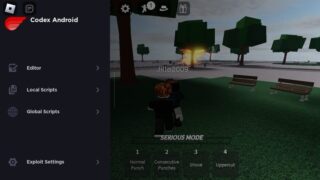
Codex Executor is a Roblox exploit tool that works on Android, iOS, and Windows (using emulator). It lets you run scripts in your favorite games with less waiting, many features are free, and you get built-in script libraries. Codex stands out because it often doesn’t force you to get activation keys (key system), it updates quickly after Roblox patches, and it runs smoothly even on lower-end devices. Just like Delta or Arceus, it has a Script Hub, but Codex aims to make things a bit simpler by reducing restrictions and steps. Keep in mind: installing on iPhone may require sideloading tools, and after big Roblox updates you may need to wait a bit for Codex to catch up.
More about Codex
Codex comes free, with some optional paid perks, and lets you run game scripts like for Blox Fruit, Fisch, Grow a Garden and more. Some Codex builds are keyless (you install and use them right away), while others use a codex key you get by doing a quick verification step (explained below). Either way, the app is designed to be easy for beginners.
Also it comes with UNC support (tested to have a very high UNC score), which means most popular Roblox scripts work well on it. As for safety, Codex is considered “undetected” right now, but like all Roblox executors, there’s no 100% guarantee. Roblox updates can flag any exploit, so always download only from official sources and use a secondary Roblox account for testing scripts.
Features of Codex Executor
Codex gives you most of its features for free, making it one of the best choices for beginners who don’t want to spend money. You’ll find fast injection, wide script support, and regular updates to keep up with Roblox patches.
Codex Executor comes packed with features that make it stand out in the Roblox exploiting world. It’s built for both new players who just want to try scripts and advanced scripters who need powerful functions. Here’s what makes it special:
Free & Easy to Use
Codex can be downloaded and used without paying, making it one of the most beginner-friendly Roblox executors.
High UNC Score
Supports UNC 98%, which means it runs most Roblox scripts smoothly (like Blox Fruits, Pet Sim X, and more).
Fast Script Injection
Loads and executes scripts quickly without freezing or heavy lag.
Frequent Updates
Stays updated with Roblox patches, so you don’t have to worry about it breaking often.
Safe Execution (Undetected)
Codex aims to stay undetected, but like all executors, risk depends on Roblox updates. Always use a spare account for testing.
Script Hub Access
Comes with a built-in script hub so you don’t have to search around the internet for scripts.
Download Codex Executor
Latest Version APK & IPA for Android & iOS
Safe Download • Verified Files
Clean Tested file download
VirusTotal scanned
100% Browser protection
How to Download Codex Executor
- Click on the button [Download for Android] above to get the Codex APK.
- Once you click, the download will begin automatically.
- Wait for the download to complete.
- After it reaches 100%, the apk file will be saved on your device.
How to Install & Use Codex Executor
Once you’ve downloaded Codex Executor, the next step is installing it.
Don’t worry if it seems a little tricky at first, just follow the step-by-step guide below, and you’ll have Codex installed and running on your device in no time.
- Open the Codex APK file you downloaded on your device.
- Tap Install and wait for the app to finish installing.
- When installation completes, tap Launch to open Codex.
- Sign in to Roblox and pick any game to join.
- A Codex Key window will pop up inside the app — tap Copy Whitelist Link.
- Open your web browser and paste the link you just copied.
- The link will take you to the Codex key page, where you must complete a short Linkvertise verification (follow the on-screen steps).
- After you finish the verification, you’ll receive the activation key.
- Return to the Codex app, paste the key if required, restart the app if needed, then attach/inject and enjoy your favorite games.
If anything fails (key doesn’t appear or the app won’t inject), try clearing the browser cache, using a different browser or network, or emial us for support.
How to Get Codex Executor Key for Free
After you finish installing Codex Executor, the next step is activating the key so you can use it for free.
Below we’ve put together simple, step-by-step instructions to help you get your Codex key and start playing right away.
- After installing Codex, open Roblox and join any game.
- The Codex key prompt will show up while you’re in the game.
- Tap the Whitelist Link button, this copies a special URL to your clipboard.
- Open your web browser (Chrome/Safari) and paste the copied link into the address bar.
- You’ll land on the Codex key page that uses Linkvertise. Complete the short tasks shown there (follow each on-screen instruction).
- When the Linkvertise steps finish, the site will give you the activation key.
- Go back to the Codex app, paste the key if asked, and you’re ready to use Codex.
Codex Executor FAQs
How do I get the Codex key?
Open Codex, join any Roblox game, tap Copy Whitelist Link, then paste that link into your browser and finish the short tasks (Linkvertise). After that you will get the key to activate Codex. If the link does not work, try a different browser or network.
I completed the Linkvertise steps but I did not get a key — what now?
Try these quick fixes: clear your browser cache, disable ad-blockers, use a different browser, or switch from Wi-Fi to mobile data. If it still fails, repeat the steps later — sometimes the Linkvertise flow times out.
Why won’t Codex install on my iPhone?
iPhone installs usually need sideloading tools (ESign or Sideloadly). ESign is no-PC but can be unstable; Sideloadly (PC) is more reliable because it signs the app with your Apple ID. If ESign fails, try Sideloadly.
My antivirus flags Codex as a virus — is it dangerous?
Most antivirus alerts for executors are false positives. Antivirus software often flags injection tools because of how they work. If you downloaded Codex from an official source, it’s usually safe — but always be careful and scan files with VirusTotal or use a spare machine/account. For general antivirus handling, follow vendor guidance on reporting false positives.
Codex opens but scripts crash or UI is missing — how to fix?
Common fixes: update Codex to the newest release, reinstall Roblox, restart your device, clear Roblox cache (Android), and try a different script. Many crashes happen right after a Roblox update; the devs usually push a patch soon after.
Does Codex work on PC / Windows?
Yes, but most users run Codex on PC via an Android emulator (BlueStacks, LDPlayer, etc.). Make sure virtualization (VT-x) is enabled and the emulator has enough RAM/CPU assigned.
Is Codex keyless or does it need a key every time?
Some Codex builds are keyless (you can use them right after install). Other builds use the key system (Linkvertise flow). Always check the download notes so you know which version you have.
Will using Codex get me banned on Roblox?
There is always a risk. Roblox forbids exploits. To lower risk: use a secondary account, avoid public servers, don’t spam obvious cheats, and keep Codex updated.
My Codex app won’t open on Windows — any tips?
Make sure required dependencies are installed (e.g., .NET Framework, Visual C++ Redistributables). Also whitelist Codex in Windows Defender if you are sure the file is official. Reinstall if necessary.
Is Codex compatible with modern scripts (UNC / SUNC)?
Codex scores high on UNC compatibility (many scripts run fine). Public info on full SUNC support is not clear — check the Codex Discord for the latest technical updates.
Linkvertise gets stuck on "loading" — what can I do?
Try a different browser, disable extensions (especially ad-blockers), or switch networks. Closing other tabs and retrying often helps. If Linkvertise still stalls, try again later — sometimes their servers are busy.
Where can I get help or report a problem?
Join the Codex Discord for the newest files, fixes, and community help. Also check the official contact/support page if you need direct help.