
What is Delta Executor?
Delta Executor is a free Roblox script executor that allows players to run custom scripts inside Roblox games. Unlike low-quality executors that crash or get detected, Delta Executor offers:
- Smooth script execution without FPS drops.
- Cross-platform support: Android, iOS & Windows PC.
- Built-in Script Hub: Pre-loaded popular Roblox scripts.
- No key or Bypass Key Option: making it faster to use.
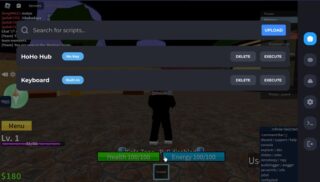
Delta Executor is designed for Roblox players who want a safe, powerful, and updated exploit tool.
Key Features of Delta X
Delta Executor (aka Detla X) isn’t just another Roblox script executor, it’s one of the most advanced tools available for roblox mobile gamers.
The new Delta X v2 update brings a smoother interface, stronger stability, and faster script execution, making it a go-to choice for Roblox players who want to unlock more possibilities in their favorite games.
Whether you’re into Blox Fruits, Pet Simulator X, or just exploring script hubs, Delta Executor gives you the power to run scripts with ease, speed, and reliability.
Platform Compatibility
Android & iOS: APK for mobile devices and direct app for iPhone/iPad. Limited support for PC.
Fast Script Execution
Instant script loading without freezing Roblox. Smooth gameplay with low crash rate.
Built-in Script Hub
Preloaded with popular scripts. Access hundreds of custom Roblox scripts without the need to search online.
Key System (+Bypass)
By default, Delta Executor uses a key system to prevent abuse. But advanced users can find no key Roblox executor methods to bypass it.
Safety & Security
Regular updates to stay undetected from Roblox patches. Secure download from official sources only.
Free forever
Our products are completely free to use, and we will never ask you to pay for any of our products.
Download Delta Executor
v2.715 APK for Android
Safe Download • Verified Files
Clean Tested file download
VirusTotal scanned
100% Browser protection
Download Delta for iOS
Want to use Delta Executor on your iPad/iPhone? We’ve created a dedicated guide for iOS users. Follow step-by-step instructions to set up Delta on your iOS device using IPA file or direct install.
Download Delta for MacOS
Want to use Delta Executor on your Mac PC? We’ve created a dedicated guide for mac OS users. Follow step-by-step instructions to set up Delta on your macOS device using .dmg file or direct install.
Download Delta for PC
Want to use Delta Executor on your computer? We’ve created a dedicated guide for Windows users. Follow step-by-step instructions to set up Delta on your PC using an emulator and start running Roblox scripts seamlessly.
How to Install Delta Executor on Mobile (Android)
Follow this step-by-step guide to install Delta Executor APK on your mobile device:
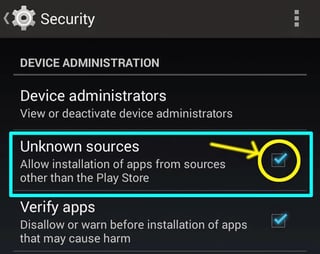
- Go to Settings > Security > Unknown Sources on your Android device.
- Enable it so you can install apps outside the Google Play Store.

- Visit the official Delta Executor website.
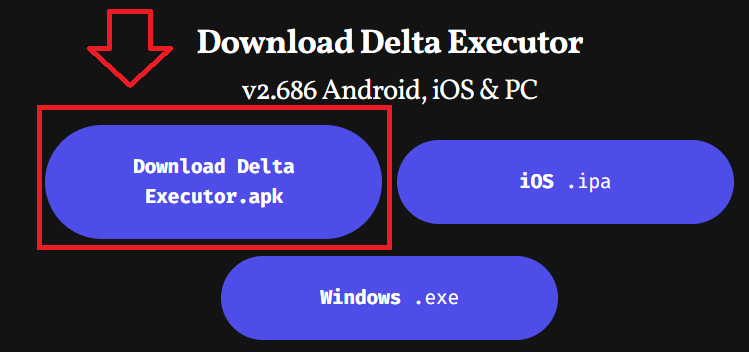
- Download Official Delta Executor APK by clicking the Android.apk button.

- Locate the downloaded file in your device’s Downloads folder.
- Tap it to start installation.
- Launch the Delta Executor app.
- Log in, load your favorite Roblox game, and start executing scripts from the built-in hub.
Need full instructions? Read the full install guide here. Learn more about the key system here.
Andriod System Requirements
- Operating System: Android 6.0 or higher
- Processor: Octa-Core, 1.6 GHz or above
- RAM: 4 GB or more
- Storage: At least 200 MB of available space
- Internet Connection: Minimum 4G
- Permissions Required:
- Camera
- Gallery
- Install from Unknown Sources
iOS System Requirements
- Operating System: iOS 12.2 or later
- Processor: A11 Bionic chip or newer
- RAM: 3 GB or more
- Storage: At least 180 MB for the app, plus additional space for Roblox game data
- Internet Connection: Minimum 4G
- Permissions Required:
- Camera
- Gallery
- Install from Unknown Sources
Version History & Changelog Update
Delta Executor New Update July 2026
[Version X (10.53) “Delta-2.673.713.apk”]
[Changelog] — 5/27/2025
- Updated to 2.673.713
- Improved Loading Times
- Improved Stability
- Brand New Loader
- Bypassed Detections
- Bug Fixes
[Version X (10.52) “Delta-2.671.1822.apk”]
[Changelog] — 5/14/2025
- Updated to 2.671.1822
- Improved Stability
- Bypassed “Automated Action Against Modified Clients”
- Bug Fixes
[Version X (10.51) “Delta-670.714-01.apk”]
[Changelog] — 5/05/2025
- Updated to 2.670.714
- Improved Stability
- Bypassed New Detections
- Improved Security
- Improved Functions:
- request (rewritten)
- WebSocket library (rewritten & added Delta headers)
- clonefunction
- hookfunction
- restorefunction (added restoration for L -> C hooks)
- replicatesignal (added multiple argument support)
- gethiddenproperty (added SharedString support)
- getgc
- filtergc
- getfunctionhash
- Added the Delta library
- Fixed All Known Serverhop Crashes
- Added “Anti AFK” setting
- Added Special Vietnam Routing
- Bug Fixes
[Version X (10.5) “Delta-668.660-01.apk”]
[Changelog] — 4/15/2025
- Updated to 2.668.660
- Improved Stability
- Bypassed New Detections
- Added filtergc
- Added pibble
- Improved
getrenv - Improved
getfunctionhash - Improved
restorefunction - Improved
WebSocket.connect - Removed Herobrine
- Bug Fixes
How to Get the Activation Key (Step-by-Step Guide)
To unlock the full power of Delta Executor on iOS, Android, or PC, you need to activate it with a Delta Key. The process is simple but requires following each step carefully. Below, we’ve explained the official method with images to help you get your Delta Executor activation key.
- First, open the Delta Executor app on your iPhone, iPad, Android device, or PC (if you’re using an emulator).
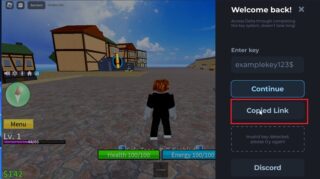
- On the main interface, you’ll find a “Copy Link” button. Tap it to copy the Keysystem link.

- Once copied, open your preferred browser (Safari or Chrome) and paste the link into the search bar.
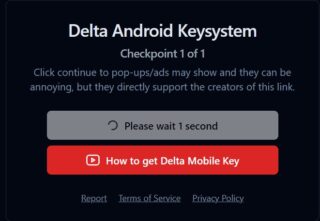
- You’ll be redirected to the official Delta Android/iOS Keysystem screen.
- Here, you’ll see instructions along with an option to download a video guide or simply press the Continue button.
- Tap Continue to proceed.

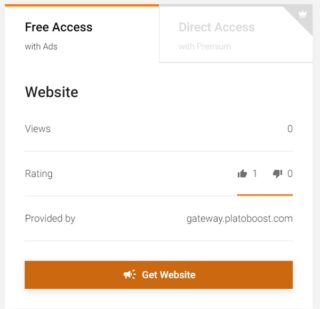
- You’ll now land on LinkVertise, where you need to complete a simple verification task.
- This usually involves clicking a button like “Free Access” and briefly exploring a website.
- Follow the on-screen steps until you’re granted access.

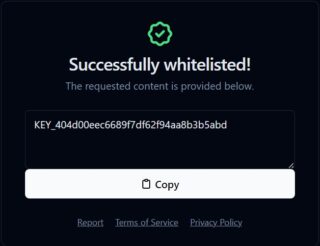
- Once the task is complete, you’ll receive your Delta Key.
- Copy the key and paste it back into the Delta Executor app’s key box.

- After pasting the key, your Delta Executor will be whitelisted successfully.
- Now you can enjoy running all your favorite Roblox scripts and features without restrictions.
Important Note:
The Delta Key is valid for 24 hours only. After it expires, you must repeat the same process to get a new key.
How to Execute Scripts Using Delta
Running scripts with Delta Executor is super easy once you have it installed. Just follow these steps and you’ll be loading your favorite Roblox scripts in no time:
- Launch the Delta Executor app on your Android or iOS device.
- Make sure Roblox is already installed on your device.
(If you have not downloaded Roblox on your mobile, download it now). - Tap the Attach/Inject button.
- This connects Delta Executor to Roblox so it can run scripts.
- Wait a few seconds until it says “Successfully Attached” (don’t skip this step, or scripts won’t work).
- Copy your Roblox script from a script hub or paste one you already have.
- Paste the script into the Delta Executor script box.
- You can also open the built-in Script Hub to choose ready-to-use scripts for games like Blox Fruits or Pet Simulator X.
- Hit the Execute button.
- Boom! The script will start running inside Roblox.
- You’ll now see new features or custom modifications depending on the script you’re using.
- Test out the new functions in your game.
- Switch scripts anytime by clearing the box and adding a new one.
- After installing the Delta Executor always used trusted and verified scripts provided by Grow a Garden Scripts Official Website.
Supported Roblox Games & Scripts
Delta Executor is compatible with almost every Roblox game. Popular supported games include:
Popular Supported Games:
Popular Supported Scripts:
- Owl Hub
- Infinite Yield
- Blox Fruits Script Hub 2025
- Grow a Garden Scripts
- Pet Simulator X Auto Farm & Hatch
- Brookhaven Auto Rob Script
- Pet Simulator X All Pets Unlock
- Fly Script
Delta Script Hub - Best Roblox Scripts
With Delta Executor, you can run a wide variety of powerful and customizable Roblox scripts - directly on Android, iOS, or emulator.
Explore scripts for your favorite games and automate everything from farming to combat.
Inside Delta Executor’s script hub, you’ll find ready-to-use scripts for:
- Delta Executor Blox Fruits script (auto farm, ESP, teleport).
- Delta Executor Pet Simulator X script (auto hatch, pets dupes).
- Delta Executor script hub for hundreds of Roblox titles.
Delta Script Example (Code Snippet)
-- Blox Fruits Autofarm Example
repeat
    wait()
    game.Players.LocalPlayer.Character.HumanoidRootPart.CFrame = workspace.Enemies["Pirate"].HumanoidRootPart.CFrame
    game:GetService("ReplicatedStorage").Remotes.Combat:FireServer("Attack")
until not game.Players.LocalPlayer.Character:FindFirstChild("Humanoid")
Want to protect your script? Use our Free Lua Obfuscator
Delta Executor Alternatives
If Delta Executor is not working or you want to try other options, here are the best alternatives:
- Fluxus Executor – Great for Android & PC.
- Krnl Executor – Stable, but mainly for PC (emulator for now).
- Synapse X – Paid premium executor with no key system.
Delta Executor vs Other Roblox Executors
| Feature | Delta Executor | Krnl | Fluxus | Synapse X |
|---|---|---|---|---|
| Platforms | Android, iOS, Windows, Mac | Android/iOS only | Android/Windows | Windows only |
| Key System | Yes (with bypass option) | Yes | Yes | No (premium) |
| Script Hub | Built-in | Limited | Built-in | Yes |
| Cost | Free | Free | Free | Paid ($20) |
| Stability | High | Medium | Medium | Very High |
Verdict: For mobile users, Delta Executor is currently the best free Roblox executor.
Delta X Safety & Security
We understand your concerns. Here’s how Delta Executor is built to be safe, secure, and trusted by thousands of Roblox users worldwide.
Why Antivirus Flags Executors
Executors use code injection and memory manipulation - both behaviors that antivirus programs associate with malicious software. Even clean, safe tools like Delta Executor can trigger false positives. Read more: Why Antivirus Flags Executors
What Makes Delta Executor Safe
Clean, encrypted build. No spyware, backdoors, or tracking. Secure memory execution layer. Verified safe by community & scanners. Read more: What makes Delta safe (encryption, no malware)
Weekly Updates & Community Feedback
Delta Executor is updated every week to fix bugs, bypass new anti-cheat systems, and improve stability - all based on real user feedback from our Discord and YouTube community.
Delta Executor Reviews
Players widely consider Delta Executor one of the most powerful and safe Roblox executors in 2025 because of:
- Free access to advanced scripts.
- Support for multiple devices (Android, iOS, Windows, MacOS).
- Regular updates and patch fixes.
- Smooth gameplay without frequent crashes.
If you’re looking for the best Roblox exploit for mobile, Delta Executor download is the way to go.
What Users Are Saying
“After trying 4 different executors, Delta is the only one that worked smoothly on my Android phone without crashing.”
@NoobCoderX
“Runs great on iOS through AltStore. The interface is clean, and the keyless version was 100% worth it.”
Verified User
“Best script hub integration I’ve seen. Instant load, even in emulators.”
YouTube Comment
“Delta is the only one that didn’t crash my game. Got it working in under 2 minutes on my phone.”
@ScriptzHub
User Trust by the Numbers
120k+ Downloads
Delta Executor is one of the fastest-growing mobile Roblox executors in 2026.
98.7% Uptime
Our team maintains regular patch cycles and performance monitoring.
25k+ Users
Used across Android, iOS, and emulators worldwide.
Community Support
Delta Executor is more than just a tool — it's backed by an active community of scripters, support staff, and developers ready to help you get started or troubleshoot issues.
Join Our Discord Server
Need fast help or want to chat with other users? Join the official DeltaDevs Discord for:
Real-time support from our team. Script help, updates, and exclusive previews. Community-led troubleshooting and tips.
Community Hub & Forums
We’re building an ecosystem where users can collaborate, publish, and improve.
Check out our community resources:
Script Hub – Browse and Use Community Scripts
Common Questions & Support Topics
Use the FAQs to find fast answers to:
- Why do I need a key system?
- What if Delta Executor doesn’t open?
- Can I use it on Windows?
- Is Delta safe to install?
- How do I run scripts?
Still stuck? Our Troubleshooting Guide covers errors, crashes, emulator support, and installation fixes.
You're Not Alone
Thousands of users rely on Delta Executor daily - and you're never far from help.
Whether you're just starting out or writing your own modules, the DeltaDevs community has your back.
Want to share your experience?
Join the community or leave a review in our Discord server! Join Now
Delta Executor FAQs
Frequently Asked Questions
We’ve compiled answers to the most common questions about Delta Executor to help you get started quickly and safely.
What is Delta X Executor?
What is Delta X Executor?
Delta Executor is a mobile-first Roblox script executor built for Android and iOS. It allows users to safely run Lua scripts inside Roblox using a custom, secure environment. It also works on Windows using Android emulators like BlueStacks or LDPlayer.
Is Delta Executor Safe to Use?
Is Delta Executor Safe to Use?
Yes — Delta Executor is developed by DeltaDevs and undergoes regular testing. It does not contain any malware, spyware, or tracking code. However, like most executors, it may trigger false antivirus warnings due to how it interacts with game memory.
How Do I Install Delta Executor?
How Do I Install Delta Executor?
Installation depends on your device:
- Android: Download the APK, allow unknown sources, install, and run.
- iOS: Use AltStore or Scarlet to sideload the IPA.
- Windows: Run inside an emulator.
Full step-by-step guide:
How to Install Delta Executor →
Why Is My Antivirus Flagging Delta X?
Why Is My Antivirus Flagging Delta X?
Executors often get flagged because they use memory injection — a technique also used by malware. This does not mean Delta is unsafe.
Learn why false positives happen here:
Why Antivirus Flags Executors →
How Do I Use Scripts With Delta X?
How Do I Use Scripts With Delta X?
- Open Delta Executor after launching Roblox
- Paste or load a script
- Tap Execute
- Done! You’ll see the script running in real time
Need scripts? Visit our Script Hub →
Is Delta Executor Free?
Is Delta Executor Free?
Yes! Delta is free to download and use. However, free users go through a key system to activate the tool. Premium users enjoy keyless access and faster support.
Legal Disclaimer
Delta Executor is for educational purposes only. We do not promote cheating in online games. Use at your own risk.